A Ten-Minute Routine for Following One Public Document
A ten-minute routine for following one public document helps you identify its type, locate the useful passage and choose a sensible next source.
A ten-minute routine for following one public document works when you give each minute a job. Use it to identify the record, find the relevant passage and decide what to check next—not to read every line.
Open the document and a blank note on paper or in a notes app. Set a ten-minute timer. If the document is a long report, use the session to orient yourself and mark a starting point for a later read.
Give each part of the ten minutes a job
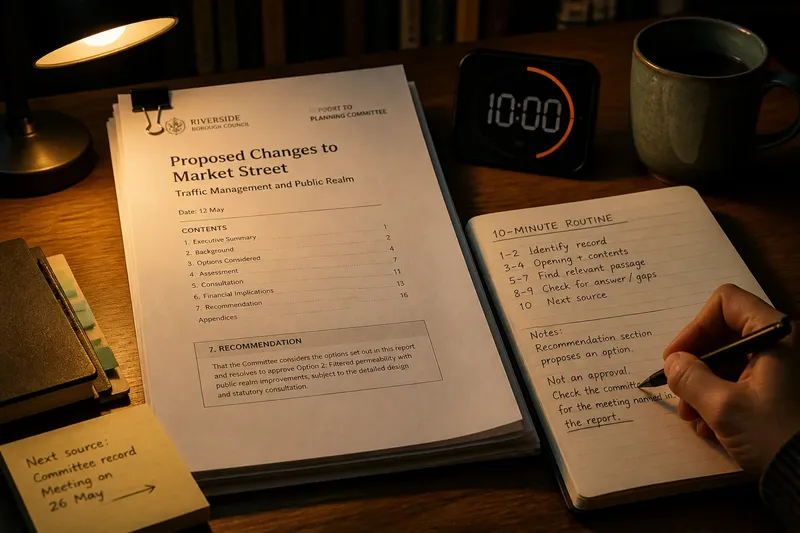
Use this schedule as a firm limit, not a promise that every question can be settled in ten minutes:
- Minutes one and two: Record the title, issuing organisation, document type and date shown on the document.
- Minutes three and four: Read the opening paragraph, summary and contents list, if present. Write one sentence about what the document is for.
- Minutes five to seven: Use the headings or the document’s search function to locate the passage relevant to your reason for opening it. Read that passage and any directly connected paragraph.
- Minutes eight and nine: Check the passage for the answer, unresolved question and any named meeting, report number, link or later action.
- Minute ten: Write the next source or mark the question unresolved. Stop when the timer ends; schedule a separate reading session if the passage needs more attention.
For a scanned paper, use the printed contents page or headings instead of search. If you cannot find the relevant section within the allotted time, record where you looked and what was missing rather than rushing through the rest.
Choose a reading route for your immediate need
Pick one route before you start. Each route narrows the document to the details most likely to answer your question.
- If you need a date or deadline: Check the title, opening lines and sections naming a meeting, response period or required action. If the document gives a date, record it with the action it relates to; if it does not, check the linked notice or official calendar instead of inferring a date.
- If you need to know what is under consideration: Find the issue, the responsible body and the document’s purpose. If it explains or recommends an option, note that it is preparatory; if it explicitly records an outcome, note where that outcome appears.
- If you are following a change: Check the document date, references to earlier papers and any named later step. If it points to a newer version, follow that link; if it does not, search the organisation’s records using the title or reference number.
- If the document is unfamiliar: Find the issuing organisation, label and contents list. If these identify the record’s role, use that role to choose a section; if they do not, keep its purpose marked as uncertain and look for a related explanatory page.
Imagine you open a fictional council report to learn whether a proposed street change has been approved. You note that it is a report issued by the council and dated 12 May; these are invented details for this example. Its opening says it recommends one option for committee consideration, so you search the headings and read the section called “Recommendation”. That section proposes the change but gives no outcome. You write, “Not an approval; check the committee record for the meeting named in the report.” The result is a clear next destination, though the report alone cannot settle whether the change was approved.
Identify the record before interpreting its content
Check the title, organisation name, document label and date printed on the document. A web page’s update date or a file’s download date may refer to the copy rather than the date the content was issued. Record those dates separately if both matter.
Classify the item in plain language: a public notice, agenda, report, consultation paper, policy, decision record or minutes. An agenda lists business planned for a meeting. A report presents information, options or recommendations. Minutes record the meeting’s proceedings, while a decision record states an outcome in the form used by that organisation. Labels and formats vary, so check the document itself rather than assuming every record uses the same structure.
Keep the identification note short, such as “planning report, issued by the council; date shown: 12 May”. If the date is absent, write “date not shown”. A precise note helps distinguish this item from another paper with a similar title.
Find the passage that answers your question
Scan the opening, summary and headings for verbs that reveal the document’s function: announces, explains, invites, recommends, records or decides. An invitation to comment describes an opportunity to respond; an account of comments received describes responses already submitted. A recommendation proposes an option but does not, on its own, establish that the option was approved.
Turn the document’s purpose into one plain sentence. For example: “This paper compares options and recommends one for committee consideration.” Then search for the heading most relevant to your need. In meeting papers, a “Recommendation” section often states what the author asks the committee to do; in a public notice, a section on “How to respond” may explain the action open to readers.
If a heading appears to promise an answer but the text does not give one, record that gap. Do not fill it with an assumption. A note such as “The paper names a recommendation but no outcome” is more useful than “unclear”.
Turn the passage into a checkable next question
Write one question that points to a specific record or detail. Useful questions include “Which meeting considered this paper?”, “Where does the organisation record the outcome?” and “Has a later notice replaced this one?” Avoid a list of unrelated uncertainties; one focused question makes the next search easier to direct.
Add a few words identifying the passage that prompted it. For instance: “Recommendation section proposes an option; check the named meeting record for the outcome.” If the document answers your question, note the heading or page reference instead of copying a long passage.
When the answer is absent, leave it unresolved. Public information may be split across a paper, a meeting record and a later notice. The missing detail in one document is a reason to check its references, not a reason to assume no record exists.
Choose the next source from the question you wrote
Match the question to a likely source. A question about a date points towards a notice, official calendar or agenda. A question about an outcome points towards the relevant decision record or meeting record. A question about the reason for an option points towards the report’s evidence or cited background paper.
Start with details named in the document: a meeting title, reference number, department, linked paper or section heading. Search the organisation’s public records page or meeting-paper archive with those terms. If the document links to a later version, check that version before relying on the earlier copy.
Write down a destination rather than “look online”: “Open the committee record for the meeting named in the report” gives you a place to begin. If the organisation’s website has separate sections for agendas and decisions, choose the one that matches your question.
What should you check when a detail is unclear?
Which date should I write down?
Record the date printed on the document and note a separate page update date if one appears. If the document has no date, write “date not shown” and check a linked official record rather than guessing from the file name.
What if the document names a meeting?
Copy the meeting name and date as printed, then search the organisation’s meeting page for matching papers or records. If several meetings have similar names, use the report title or reference number to narrow the search.
What if I cannot tell what the document is for?
Use the title and headings to describe what it appears to do, but mark that interpretation as uncertain. Then look for a linked report, notice or explanatory page that identifies its purpose.
What if ten minutes is not enough?
Stop at the timer and write down the section you reached, what remains unanswered and where you intend to resume. A longer or technical document needs a separate session; do not treat an incomplete scan as a full reading.
Finish with a note that supports the next visit
Use the final minute to write four short lines: document type, date, purpose and next question or source. For example: “Council report; 12 May; recommends an option; check the committee record for the outcome.” Keep the title or link with the note so you can return to the same item.
This ten-minute routine for following one public document is a way to find your place, not a substitute for careful reading when the wording has consequences. Before acting on a deadline or formal instruction, check the current official notice and contact the responsible organisation if an important detail remains unclear.
When you return, confirm that the next source concerns the same organisation and issue. A matching reference number, meeting name or document link is a better guide than a similar-sounding title.